订阅队列#
订阅一个 队列组 与单独订阅主题只有一点点不同。应用程序订阅时只需包含一个队列名称即可。而服务器会在队列组的所有成员之间做负载均衡。在 NATS 集群中,每个成员都有相同的机会接收到特定的消息。
请注意,NATS 中的队列组是动态的,无需任何服务器配置。
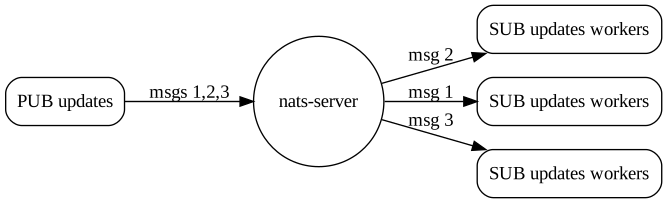
例如,要订阅名为 workers 的队列,并监听主题 updates:
{% tabs %} {% tab title="Go" %}
nc, err := nats.Connect("demo.nats.io")
if err != nil {
    log.Fatal(err)
}
defer nc.Close()

// Use a WaitGroup to wait for 10 messages to arrive
wg := sync.WaitGroup{}
wg.Add(10)

// Create a queue subscription on "updates" with queue name "workers"
if _, err := nc.QueueSubscribe("updates", "workers", func(m *nats.Msg) {
    wg.Done()
}); err != nil {
    log.Fatal(err)
}

// Wait for messages to come in
wg.Wait()
{% endtab %}
{% tab title="Java" %}
Connection nc = Nats.connect("nats://demo.nats.io:4222");

// Use a latch to wait for 10 messages to arrive
CountDownLatch latch = new CountDownLatch(10);

// Create a dispatcher and inline message handler
Dispatcher d = nc.createDispatcher((msg) -> {
    String str = new String(msg.getData(), StandardCharsets.UTF_8);
    System.out.println(str);
    latch.countDown();
});

// Subscribe to the "updates" subject with a queue group named "workers"
d.subscribe("updates", "workers");

// Wait for a message to come in
latch.await();

// Close the connection
nc.close();
{% endtab %}
{% tab title="JavaScript" %}
nc.subscribe(subj, {
    queue: "workers",
    callback: (_err, _msg) => {
      t.log("worker1 got message");
    },
});

nc.subscribe(subj, {
    queue: "workers",
    callback: (_err, _msg) => {
      t.log("worker2 got message");
    },
});
{% endtab %}
{% tab title="Python" %}
nc = NATS()

await nc.connect(servers=["nats://demo.nats.io:4222"])

future = asyncio.Future()

async def cb(msg):
  nonlocal future
  future.set_result(msg)

await nc.subscribe("updates", queue="workers", cb=cb)
await nc.publish("updates", b'All is Well')

msg = await asyncio.wait_for(future, 1)
print("Msg", msg)
{% endtab %}
{% tab title="C#" %}
// dotnet add package NATS.Net
using NATS.Net;

await using var client = new NatsClient();

var count = 0;

// Subscribe to the "updates" subject with a queue group named "workers"
await foreach (var msg in client.SubscribeAsync<string>(subject: "updates", queueGroup: "workers"))
{
    Console.WriteLine($"Received {++count}: {msg.Subject}: {msg.Data}");

    // Break after 10 messages
    if (count == 10)
    {
        break;
    }
}

Console.WriteLine("Done");
{% endtab %}
{% tab title="Ruby" %}
require 'nats/client'
require 'fiber'

NATS.start(servers:["nats://127.0.0.1:4222"]) do |nc|
  Fiber.new do
    f = Fiber.current

    nc.subscribe("updates", queue: "worker") do |msg, reply|
      f.resume Time.now
    end

    nc.publish("updates", "A")

    # Use the response
    msg = Fiber.yield
    puts "Msg: #{msg}"
  end.resume
end
{% endtab %}
{% tab title="C" %}
static void
onMsg(natsConnection *conn, natsSubscription *sub, natsMsg *msg, void *closure)
{
    printf("Received msg: %s - %.*s\n",
           natsMsg_GetSubject(msg),
           natsMsg_GetDataLength(msg),
           natsMsg_GetData(msg));

    // Need to destroy the message!
    natsMsg_Destroy(msg);
}


(...)

natsConnection      *conn = NULL;
natsSubscription    *sub  = NULL;
natsStatus          s;

s = natsConnection_ConnectTo(&conn, NATS_DEFAULT_URL);

// Create a queue subscription on "updates" with queue name "workers"
if (s == NATS_OK)
    s = natsConnection_QueueSubscribe(&sub, conn, "updates", "workers", onMsg, NULL);

(...)


// Destroy objects that were created
natsSubscription_Destroy(sub);
natsConnection_Destroy(conn);
{% endtab %} {% endtabs %}
如果你运行此示例,并同时运行发送到 updates 的发布示例,你会看到其中一个实例会收到一条消息,而其他实例则不会。但接收消息的实例可能会发生变化。