数据复制
复制功能允许您在流之间进行数据移动,既可以采用一对一镜像模式,也可以将多个设置了 Sources 的流多路复用到一个新的流中。在未来的版本中,这还将支持在不同账户之间复制数据,非常适合将叶子节点中的数据发送到中央存储。
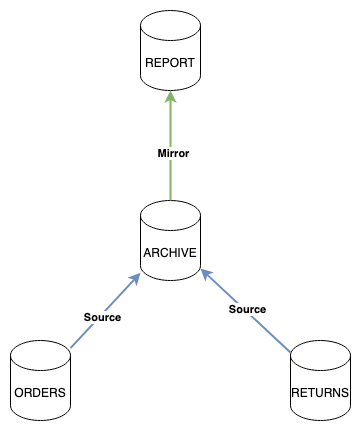
图中我们有两个主要的流:ORDERS 和 RETURNS,这些流分布在三个节点上,并且具有较短的保留期,使用内存存储。
我们创建了一个名为 ARCHIVE 的流,它设置了两个 Sources。ARCHIVE 流会从这些设置了 Sources 的流中拉取数据。这个流具有较长的保留期,使用文件存储,并在三个节点上进行复制。此外,还可以通过直接发送消息到该流来添加额外的消息。
最后,我们创建了一个名为 REPORT 的流,它从 ARCHIVE 流镜像而来,不进行集群部署,数据保留一个月。REPORT 流不会监听任何传入消息,只能从 ARCHIVE 流中消费数据。
镜像
给一个流设定 mirror 会让它从另一个流复制数据,并尽可能保持ID和顺序与原始流一致。一个 mirror 不会监听任何主题以接收新增数据。一个 mirror 可以按主题进行过滤,并可设置起始序列号(Start Sequence)和起始时间(Start Time)。一个流只能设定一个 mirror,并且一旦成为镜像,就不能再拥有任何 source。
Sources 选项
一个 source 选项代表一个原始流(数据被复制的流),一个流可以设置多个 Sources ,并从所有原始流中读取数据。同时,该流也会监听自己的主题上的消息。因此,我们无法保证绝对的顺序性,但来自单一原始流的数据会保持正确的顺序,只是与其他流的数据错杂在一起。此外,由于这种机制,可能会出现时间戳交错的情况。
一个设置了 Sources 的流也可以选择监听或不监听主题。当使用 nats CLI 创建带有 Sources 的流时,你可以使用 --subjects 参数指定要监听的主题。
一个设置了 Sources 的流可以设置起始时间(Start Time)或起始序列号(Start Sequence),并可以根据主题进行过滤。
配置
这里我们正常创建 ORDERS 和 RETURNS 流,不再展示如何创建它们。
Obtaining Stream stats

+---------+---------+-----------+----------+-------+------+---------+----------------------+
| Stream  | Storage | Consumers | Messages | Bytes | Lost | Deleted | Cluster              |
+---------+---------+-----------+----------+-------+------+---------+----------------------+
| ORDERS  | Memory  | 0         | 0        | 0 B   | 0    | 0       | n1-c2, n2-c2*, n3-c2 |
| RETURNS | Memory  | 0         | 0        | 0 B   | 0    | 0       | n1-c2*, n2-c2, n3-c2 |
+---------+---------+-----------+----------+-------+------+---------+----------------------+
现在我们添加 ARCHIVE:
nats s add ARCHIVE --source ORDERS --source RETURNS
? Storage backend file
? Retention Policy Limits
? Discard Policy Old
? Stream Messages Limit -1
? Message size limit -1
? Maximum message age limit -1
? Maximum individual message size -1
? Duplicate tracking time window 2m0s
? Allow message Roll-ups No
? Allow message deletion Yes
? Allow purging subjects or the entire stream Yes
? Replicas 1
? Adjust source "ORDERS" start Yes
? ORDERS Source Start Sequence 0
? ORDERS Source UTC Time Stamp (YYYY:MM:DD HH:MM:SS)
? ORDERS Source Filter source by subject
? Import "ORDERS" from a different JetStream domain No
? Import "ORDERS" from a different account No
? Adjust source "RETURNS" start No
? Import "RETURNS" from a different JetStream domain No
? Import "RETURNS" from a different account No
Stream ARCHIVE was created

Information for Stream ARCHIVE created 2022-01-21T11:49:52-08:00

Configuration:

     Acknowledgements: true
            Retention: File - Limits
             Replicas: 1
       Discard Policy: Old
     Duplicate Window: 2m0s
    Allows Msg Delete: true
         Allows Purge: true
       Allows Rollups: false
     Maximum Messages: unlimited
        Maximum Bytes: unlimited
          Maximum Age: unlimited
 Maximum Message Size: unlimited
    Maximum Consumers: unlimited
              Sources: ORDERS
                       RETURNS


State:

             Messages: 0
                Bytes: 0 B
             FirstSeq: 0
              LastSeq: 0
     Active Consumers: 0
然后我们添加 REPORT:
nats s add REPORT --mirror ARCHIVE
? Storage backend file
? Retention Policy Limits
? Discard Policy Old
? Stream Messages Limit -1
? Message size limit -1
? Maximum message age limit -1
? Maximum individual message size -1
? Allow message Roll-ups No
? Allow message deletion Yes
? Allow purging subjects or the entire stream Yes
? Replicas 1
? Adjust mirror start No
? Import mirror from a different JetStream domain No
? Import mirror from a different account No
Stream REPORT was created

Information for Stream REPORT created 2022-01-21T11:50:55-08:00

Configuration:

     Acknowledgements: true
            Retention: File - Limits
             Replicas: 1
       Discard Policy: Old
     Duplicate Window: 2m0s
    Allows Msg Delete: true
         Allows Purge: true
       Allows Rollups: false
     Maximum Messages: unlimited
        Maximum Bytes: unlimited
          Maximum Age: unlimited
 Maximum Message Size: unlimited
    Maximum Consumers: unlimited
               Mirror: ARCHIVE


State:

             Messages: 0
                Bytes: 0 B
             FirstSeq: 0
              LastSeq: 0
     Active Consumers: 0
配置完成后,通过 nats stream info 输出可以看到一些额外信息:
输出摘录
...
Source Information:

          Stream Name: ORDERS
                  Lag: 0
            Last Seen: 2m23s

          Stream Name: RETURNS
                  Lag: 0
            Last Seen: 2m15s
...

$ nats stream info REPORT
...
Mirror Information:

          Stream Name: ARCHIVE
                  Lag: 0
            Last Seen: 2m35s
...
这里的 Lag 表示上次看到消息时,我们报告的滞后时间。
我们可以使用 nats stream report 来确认我们的配置:
+--------------------------------------------------------------------------------------------------------+
|                                            Stream Report                                               |
+---------+---------+-------------+-----------+----------+-------+------+---------+----------------------+
| Stream  | Storage | Replication | Consumers | Messages | Bytes | Lost | Deleted | Cluster              |
+---------+---------+-------------+-----------+----------+-------+------+---------+----------------------+
| ARCHIVE | File    | Sourced     | 1         | 0        | 0 B   | 0    | 0       | n1-c2*, n2-c2, n3-c2 |
| ORDERS  | Memory  |             | 1         | 0        | 0 B   | 0    | 0       | n1-c2, n2-c2*, n3-c2 |
| REPORT  | File    | Mirror      | 0         | 0        | 0 B   | 0    | 0       | n1-c2*               |
| RETURNS | Memory  |             | 1         | 0        | 0 B   | 0    | 0       | n1-c2, n2-c2, n3-c2* |
+---------+---------+-------------+-----------+----------+-------+------+---------+----------------------+

+---------------------------------------------------------+
|                   Replication Report                    |
+---------+--------+---------------+--------+-----+-------+
| Stream  | Kind   | Source Stream | Active | Lag | Error |
+---------+--------+---------------+--------+-----+-------+
| ARCHIVE | Source | ORDERS        | never  | 0   |       |
| ARCHIVE | Source | RETURNS       | never  | 0   |       |
| REPORT  | Mirror | ARCHIVE       | never  | 0   |       |
+---------+--------+---------------+--------+-----+-------+
接下来我们在 ORDERS 和 RETURNS 里创建一些数据:
nats req ORDERS.new "ORDER {{Count}}" --count 100
nats req RETURNS.new "RETURN {{Count}}" --count 100
我们现在可以在报告中看到数据已被复制:
nats s report --dot replication.dot
Obtaining Stream stats

+---------+---------+-----------+----------+---------+------+---------+----------------------+
| Stream  | Storage | Consumers | Messages | Bytes   | Lost | Deleted | Cluster              |
+---------+---------+-----------+----------+---------+------+---------+----------------------+
| ORDERS  | Memory  | 1         | 100      | 3.3 KiB | 0    | 0       | n1-c2, n2-c2*, n3-c2 |
| RETURNS | Memory  | 1         | 100      | 3.5 KiB | 0    | 0       | n1-c2*, n2-c2, n3-c2 |
| ARCHIVE | File    | 1         | 200      | 27 KiB  | 0    | 0       | n1-c2, n2-c2, n3-c2* |
| REPORT  | File    | 0         | 200      | 27 KiB  | 0    | 0       | n1-c2*               |
+---------+---------+-----------+----------+---------+------+---------+----------------------+

+---------------------------------------------------------+
|                   Replication Report                    |
+---------+--------+---------------+--------+-----+-------+
| Stream  | Kind   | Source Stream | Active | Lag | Error |
+---------+--------+---------------+--------+-----+-------+
| ARCHIVE | Source | ORDERS        | 14.48s | 0   |       |
| ARCHIVE | Source | RETURNS       | 9.83s  | 0   |       |
| REPORT  | Mirror | ARCHIVE       | 9.82s  | 0   |       |
+---------+--------+---------------+--------+-----+-------+
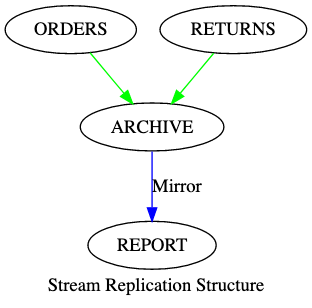
在这里,我们还传递了 --dot replication.dot 参数,该参数会将 设置情况 以 GraphViz 图表格式输出到 replication.dot 文件中。